
Task Manager
Workflow automation for the work behind every order. Build Kanban boards, control status moves, assign owners, and trigger actions without leaving Dhru Fusion.
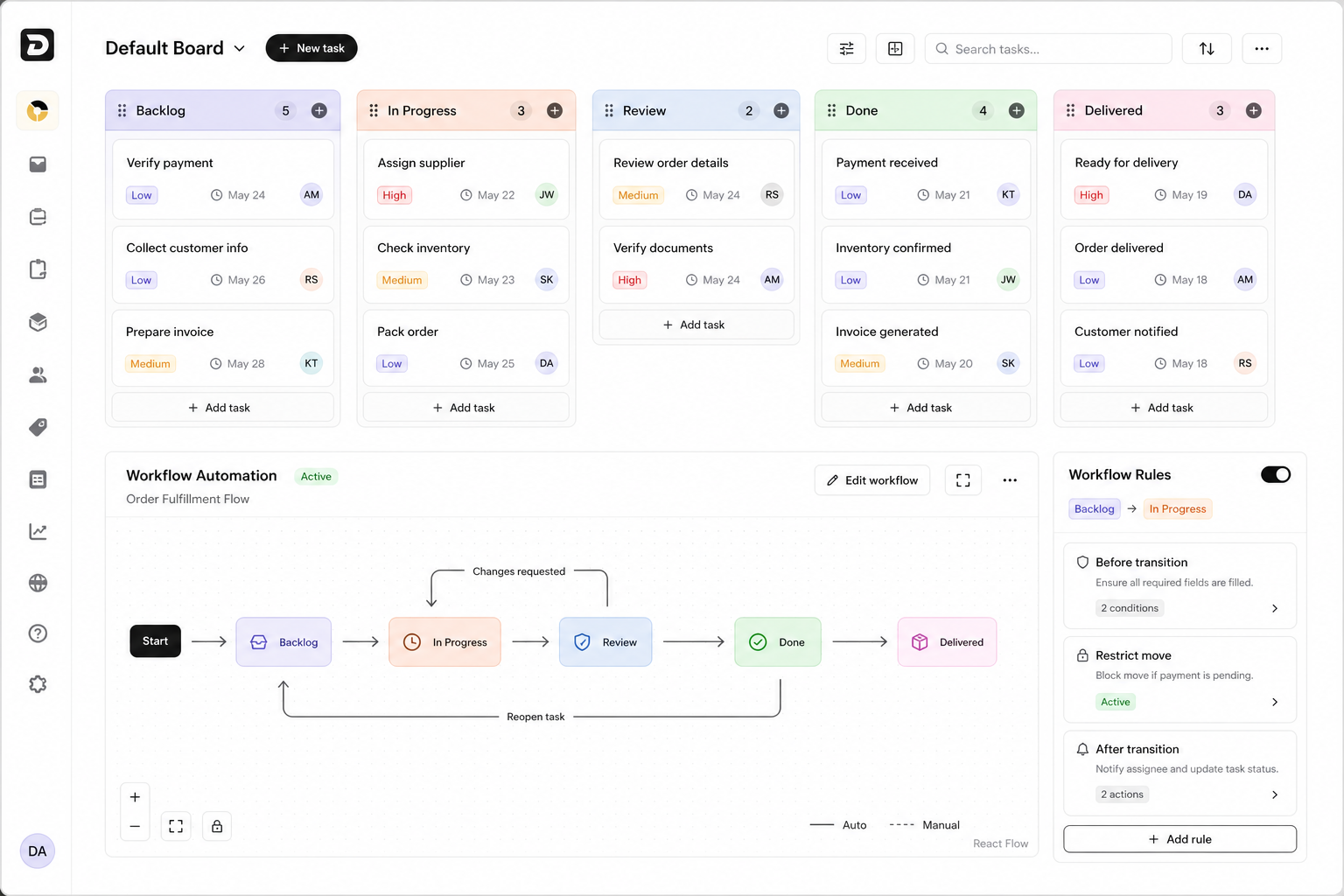
From task intake to delivery, every move can follow rules.
Task Manager gives operations teams the freedom of Kanban with the control of a workflow engine.
Create board
Build a task board for a department, fulfillment lane, supplier, or internal workflow.
Define statuses
Set Backlog, In Progress, Review, Done, Delivered, or any custom status your team needs.
Control moves
Use transition rules to decide which moves are allowed and what must be checked first.
Trigger actions
Notify staff, update fields, call webhooks, and keep the task history clean after each move.
All the task controls a serious fulfillment team expects.
Manage boards, automation, rules, priority, due dates, and team visibility without leaving Fusion.
Multiple Kanban boards
Run separate boards for fulfillment, supplier follow-up, finance checks, support tasks, and internal operations.
Visual workflow automation
Map every status path with transition labels, alternate routes, reopen flows, and delivery checkpoints.
Restricted transitions
Block risky status moves, prevent direct jumps, and protect workflows with permission-aware rules.
Before transition checks
Require fields, validate payment, request OTP, or confirm permissions before a task can move.
After transition actions
Trigger notes, notifications, webhooks, field updates, and internal follow-up after a board move.
Priority and due reminders
Track low, medium, and high priority work with due dates, reminders, assignees, and activity history.
Search and filters
Find tasks by board, status, assignee, priority, due date, customer context, or workflow state.
Team ownership
Assign work to the right staff member and keep handoffs visible across order, support, and delivery teams.
Boards stay flexible. Processes stay controlled.
Teams can move fast on cards while managers keep visibility over allowed paths, required checks, and final handoff states.
Custom boards for different departments and order flows
Drag-and-drop status movement with restricted transition support
Task cards with priorities, due dates, assignees, and activity context
Board search, sorting, list views, filters, and compact task navigation
Workflow diagrams with automatic and manual transition paths
Before-rules, after-rules, transition descriptions, and draft publishing
Common Task Manager questions.
Short answers for teams comparing Task Manager with generic Kanban boards or manual status tracking.
Is Task Manager sold separately?+
No. Task Manager is positioned as an operational module inside Dhru Fusion, so commerce, fulfillment, and team work stay connected.
Can we create more than one board?+
Yes. Teams can use multiple boards for different workflows such as fulfillment, finance checks, supplier follow-up, support, or internal operations.
Can status moves be controlled?+
Yes. Workflow automation can restrict transitions, require checks before a move, and trigger actions after a move.
Does it support normal Kanban work?+
Yes. Boards support cards, priorities, due dates, assignees, search, filters, and visual status columns.
Build workflow control into your commerce operation.
Task Manager is included as a Fusion module, so order work, staff work, and automation rules stay in the same connected workflow.